BatteryBot Pro v8.0.7
Requirements: Android 2.1+
Overview: The original Battery Indicator for Android has been reborn with a new name, a new look, and new features!
Requirements: Android 2.1+
Overview: The original Battery Indicator for Android has been reborn with a new name, a new look, and new features!
SALE: Pro is 30% off during this beta period!~ ~ ~ ~
The original Battery Indicator for Android has been reborn with a new name, a new look, and new features! Battery Indicator Pro is now BatteryBot Pro. BatteryBot Pro is currently in beta, which means it is not finished and will be undergoing rapid development, with things changing frequently. It should not have any major issues, however, and I believe that it is already better than the old Battery Indicator Pro, so here it is. Please email me if you have any issues.
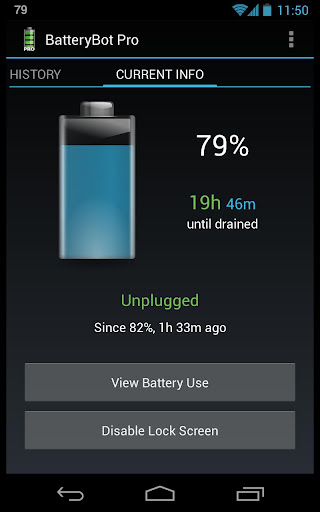
The main change, besides looking and working differently, is automatic time-remaining estimates based on recent usage. These are currently based on the past five minutes of usage, although I’ll add some options for this soon.
Three years ago I was an inexperienced computer geek who was disappointed that his Android phone couldn’t easily show him his battery level. So I created the first status bar battery indicator for Android. I’ve continued to improve as a programmer and make minor improvements to the app ever since.
Now there are many other battery apps, several of which are also called “Battery Indicator”. So I decided it was time to completely redesign the app to be more useful, more attractive, and easier to use. This beta release is the first of many steps to realize that vision. It seemed like a good time to rename the app to something unique.
Coming soon:
* Further modifications to the design
* Updated translations
* More configurability of the new features
* More and better icon plugins
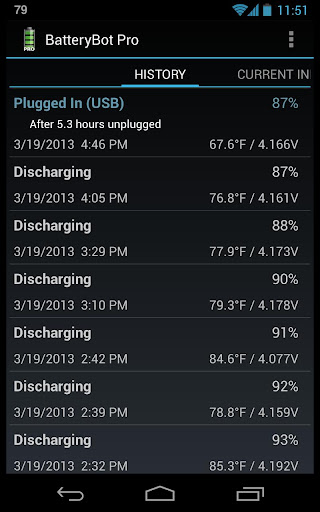
* Graphs of the battery history
* A desktop widget
I’ve never really shared my business philosophy; this is and always has been how I see it:
1) Ads are annoying. For some apps, ads might make sense, but a system utility should not have ads.
2) The free version should be simple but useful; it shouldn’t feel crippled.
3) Some people choose to purchase the Pro version because they want extra features, some because they want more customization, and many because they just want to say “thanks” for the free version.
~ ~ ~ ~
BatteryBot Pro monitors and shows your battery charge level (percent) as an icon in your status bar, with temperature, health, voltage, and time since plugged / unplugged in the notification area. It also has user-configurable alarms and logs.
Features:
• Automatic time-remaining estimates based on recent usage
• Several icon sets (including fully configurable green, amber, red, and black icons)
• Estimated charge / discharge time left
• Battery logging. You can log the battery state (charge, status, voltage, temperature) and browse the logs on the phone or export to CSV.
• Manually or automatically disable / reenable device lock screen / lockscreen / keyguard
• Alarms (full, charge above X, charge below X, temperature above X, or health failure)
• Control the notification priority on Android 4.1+ (For example, you can set to “minimum” to hide the icon but keep the notification in the tray.)
• Lots of configurability; most features are optional
• The charging indicator (the bolt under the number that indicates when the device is being charged) for the sets that have it is optional in the Pro version
• Very lightweight (please email me if you think otherwise, and I’ll help you figure out what’s wrong — I promise this app will not drain your battery.)
• Shows 1% increments even on most Motorola devices (option needs to be enabled on devices that default to 10% increments)
• Well-tested and supported on all major versions of Android (2.1, 2.2, 2.3, 3.0, 3.1, 4.0, 4.1, 4.2; Eclair, Froyo, Gingerbread, Honeycomb, Ice Cream Sandwich / ICS, Jelly Bean) and form factors (small phones, medium phones, large phones, 7-inch tablets, 10-inch tablets).
• Open source
A one-time purchase now gets you free updates for life on all your Android devices.
All requested app permissions are explained on the project website.
Please email me if you have any questions or comments.
The original Battery Indicator for Android has been reborn with a new name, a new look, and new features! Battery Indicator Pro is now BatteryBot Pro. BatteryBot Pro is currently in beta, which means it is not finished and will be undergoing rapid development, with things changing frequently. It should not have any major issues, however, and I believe that it is already better than the old Battery Indicator Pro, so here it is. Please email me if you have any issues.
The main change, besides looking and working differently, is automatic time-remaining estimates based on recent usage. These are currently based on the past five minutes of usage, although I’ll add some options for this soon.
Three years ago I was an inexperienced computer geek who was disappointed that his Android phone couldn’t easily show him his battery level. So I created the first status bar battery indicator for Android. I’ve continued to improve as a programmer and make minor improvements to the app ever since.
Now there are many other battery apps, several of which are also called “Battery Indicator”. So I decided it was time to completely redesign the app to be more useful, more attractive, and easier to use. This beta release is the first of many steps to realize that vision. It seemed like a good time to rename the app to something unique.
Coming soon:
* Further modifications to the design
* Updated translations
* More configurability of the new features
* More and better icon plugins
* Graphs of the battery history
* A desktop widget
I’ve never really shared my business philosophy; this is and always has been how I see it:
1) Ads are annoying. For some apps, ads might make sense, but a system utility should not have ads.
2) The free version should be simple but useful; it shouldn’t feel crippled.
3) Some people choose to purchase the Pro version because they want extra features, some because they want more customization, and many because they just want to say “thanks” for the free version.
~ ~ ~ ~
BatteryBot Pro monitors and shows your battery charge level (percent) as an icon in your status bar, with temperature, health, voltage, and time since plugged / unplugged in the notification area. It also has user-configurable alarms and logs.
Features:
• Automatic time-remaining estimates based on recent usage
• Several icon sets (including fully configurable green, amber, red, and black icons)
• Estimated charge / discharge time left
• Battery logging. You can log the battery state (charge, status, voltage, temperature) and browse the logs on the phone or export to CSV.
• Manually or automatically disable / reenable device lock screen / lockscreen / keyguard
• Alarms (full, charge above X, charge below X, temperature above X, or health failure)
• Control the notification priority on Android 4.1+ (For example, you can set to “minimum” to hide the icon but keep the notification in the tray.)
• Lots of configurability; most features are optional
• The charging indicator (the bolt under the number that indicates when the device is being charged) for the sets that have it is optional in the Pro version
• Very lightweight (please email me if you think otherwise, and I’ll help you figure out what’s wrong — I promise this app will not drain your battery.)
• Shows 1% increments even on most Motorola devices (option needs to be enabled on devices that default to 10% increments)
• Well-tested and supported on all major versions of Android (2.1, 2.2, 2.3, 3.0, 3.1, 4.0, 4.1, 4.2; Eclair, Froyo, Gingerbread, Honeycomb, Ice Cream Sandwich / ICS, Jelly Bean) and form factors (small phones, medium phones, large phones, 7-inch tablets, 10-inch tablets).
• Open source
A one-time purchase now gets you free updates for life on all your Android devices.
All requested app permissions are explained on the project website.
Please email me if you have any questions or comments.
What’s in this version:
v8.0.7 (Beta)
• Many subtle bugs fixed. If you’ve noticed any strange or incorrect behavior with alarms, time-remaining estimates, or time since status changed, this should (hopefully) fix things for you. As always, please let me know if you run into any problems.
• Many subtle bugs fixed. If you’ve noticed any strange or incorrect behavior with alarms, time-remaining estimates, or time since status changed, this should (hopefully) fix things for you. As always, please let me know if you run into any problems.
https://play.google.com/store/apps/details?id=com.darshancomputing.BatteryIndicatorPro